
Skip hours of manual GUI scripting. Tell Bloxsmith what your inventory looks like — grid slots, rarity borders, equipment panels, tooltips — and get a polished UI with styled frames, proper UI hierarchy, and real image assets.
These are editable visual layouts. Connect game data, button actions, purchases, and other behavior in Studio, then test the result on your target devices. See how to plan and refine your UI.
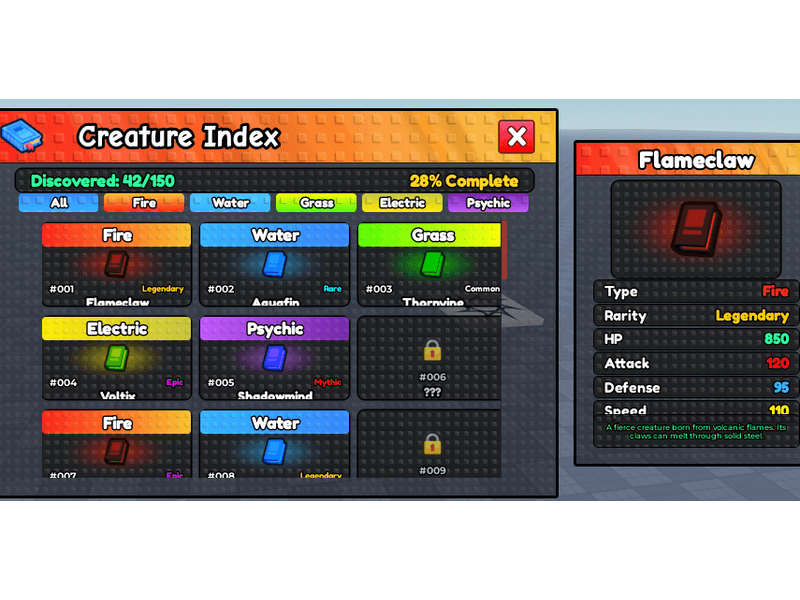
Example prompt
“Design a dark fantasy inventory screen with 6 item slots and a gold counter”
Specify a manageable number of slots and whether they should scroll. Larger inventories may need iteration and performance checks in Studio.
Yes. Mention rarity tiers in your prompt and the AI generates color-coded borders, background glows, or label badges for each tier.
Ask for category tabs such as Weapons, Armor, and Consumables. The generated layout gives you the visual tabs; connect their filtering behavior to your inventory logic in Studio.
Create an account, connect the Studio plugin, and pay only for the UI generations you use. There is no subscription.
Roblox Shop UI Generator
Generate professional Roblox shop UIs with AI. Describe your in-game store and get a polished UI with item cards, currency displays, and buy buttons.
Roblox HUD Design Tool
Design Roblox game HUDs with AI. Generate health bars, ammo counters, minimaps, wave counters, and more as a polished UI for Roblox Studio.
Roblox Leaderboard UI Generator
Create Roblox leaderboard UIs with AI. Generate ranked player lists, stat columns, podium displays, and scrollable rankings — polished UIs dropped straight into Roblox Studio.
Roblox Notification UI Generator
Generate Roblox notification UIs with AI. Create toast messages, achievement banners, reward popups, and alert systems as a polished UI.
Roblox Gamepass Shop Generator
Create Roblox gamepass shop UIs with AI. Generate VIP passes, 2x multipliers, speed boosts, and premium store interfaces as a polished UI.
Roblox Code Redemption UI Generator
Generate Roblox code redemption UIs with AI. Create promo code dialogs, input fields, success messages, and reward displays — polished UIs dropped straight into Studio.